The till that keeps selling when the signal drops.

Suklii is a cloud point of sale for cafés, shops and supermarkets. Ring up a sale below, it's a working register.

What do you sell?
Kapihan sa Baybay · Till 1
Online

Orders

Tables

Promos

Combos and deals the register applies for you

Settings

Your brand, receipts and digital receipts

Store

Your store name shows at the top of the register and on every receipt.

Logo

Square image, at least 256 × 256 px (512 × 512 looks sharpest). PNG, JPG, WebP or SVG, up to 2 MB. A transparent PNG works best.

Brand colors

Primary
Accent

Primary colors the rail, prices and highlights. Accent marks the active screen, and main buttons blend from accent to primary.

Receipt

Paper width

Digital receipts

Show first

The customer scans the QR with their phone camera, sees the receipt and can download it. No paper needed.

Reports

Kapihan sa Baybay · all tills

New here?

Take the 35-second tour.

Eight features, from ringing up a sale to selling with no signal. Sound on.

No sale lost or doubledEach sale gets its ID on the till and syncs once, even after retries.
Sells cash for 12 hours offlineCards and QR wait for signal. The till doesn't.
No card data touches usPayments use the processor's own screens.
Records stay yoursA lapsed plan turns read-only with export. Nothing is deleted.

The app

Six screens. Everything a counter needs.

Pick a screen to see what it does, then open it and try it. Everything is live: sales you ring up show in Orders, Tables and Reports.

Every screen

Register, tables and reports, one system.

The same app on the counter, the floor and the owner's desk. What you ring up shows in Tables and Reports right away.
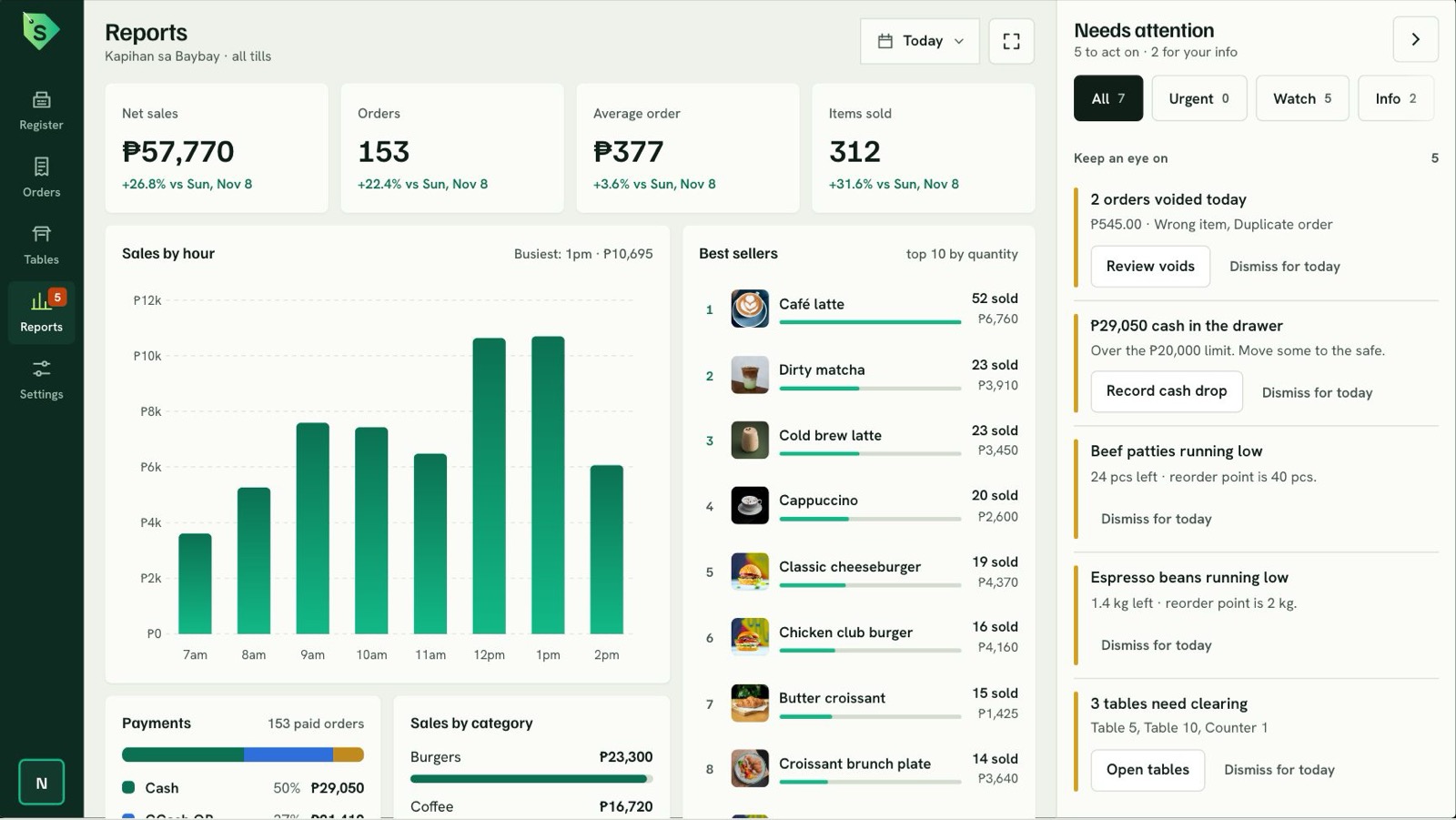
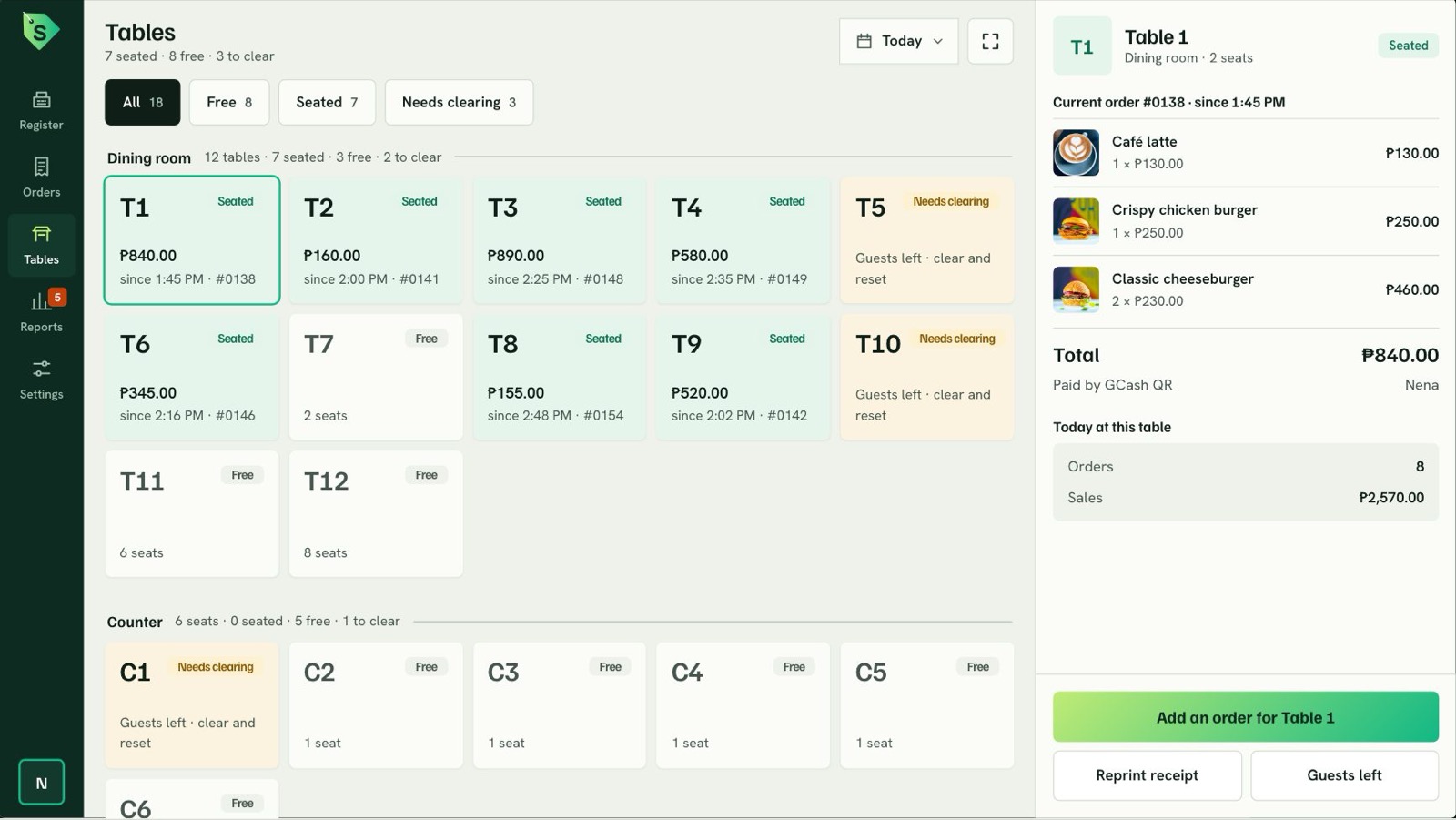
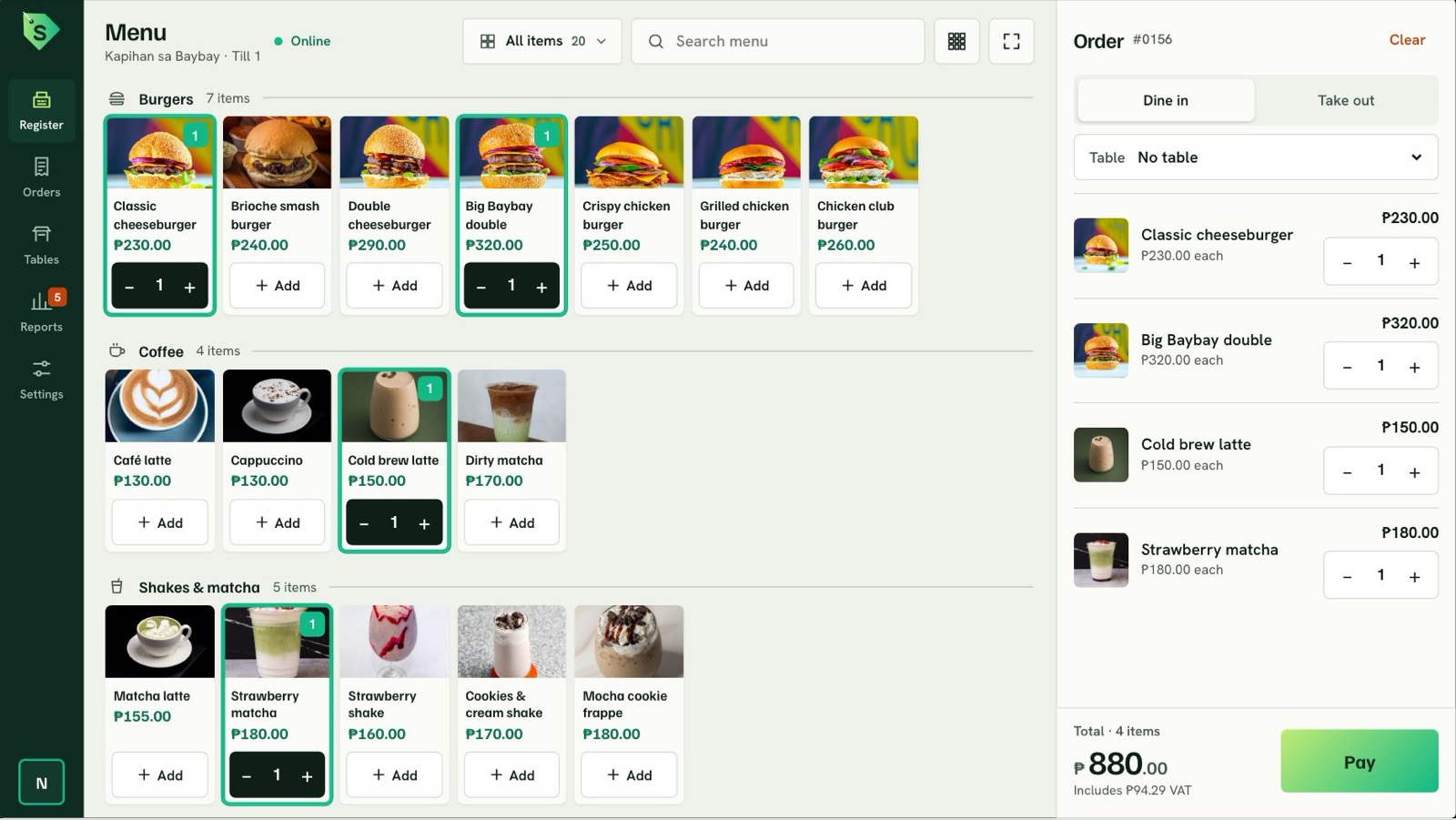
  • Register. Tap a dish, take the payment, show the sukli.
  • Tables. See who is seated, what they ordered and what needs clearing.
  • Reports. Sales by hour, best sellers and alerts, for any date range.
Try the register
Suklii Reports screen: net sales, sales by hour, best sellers and alerts Suklii Tables screen: dining room and counter tables with their open orders Suklii Register screen: menu grid with an order of four items ready to pay

Paperless receipts

Skip the paper. Scan for the receipt.

After paying, the customer scans a QR on the till and gets their receipt on their phone, with a button to download it. No app, no sign-up, no thermal paper.

  1. Charge as usual. The receipt screen offers Printed or QR.
  2. The customer scans. Any phone camera opens the receipt in the browser.
  3. They keep it. Download it as an image or save it as a PDF.

Try it: scan the code with your phone to open a sample receipt.

Scan for your receipt
Order #0162 · ₱590.00

Make it yours

Your name, your logo, your colors.

Upload a logo, pick a primary and an accent color, and choose how receipts look. The whole register follows. Try a look:

You can change or reset the look any time in the register's Settings.

Made in Puerto Princesa

Built for how stores in the Philippines sell.

12% VAT, inclusive

Prices include VAT and every receipt shows the breakdown.

GCash QR, cards and cash

Quick-cash buttons for exact, ₱500 and ₱1,000, and the sukli shown big.

Sizes and stock per size

Pick a size at the till, see how many are left, and stock goes down when the sale is paid.

Dine in, take out, tables

Seat a table, see what it ordered, and know when it needs clearing.

Alerts that matter

Voids, a full cash drawer, low stock and tables to clear, all in one place.

Reports by day or range

Today, this week, last 30 days, or any dates you pick.

Brownout and weak signal

Keeps selling cash offline and syncs every sale once the signal is back.

One system for the café, the shop and the supermarket.

Features switch on per business when you sign up.

Café & restaurant

Fast service with add-ons, and a kitchen that sees orders as they come.

  • Drink sizes and add-ons
  • Kitchen display
  • Ingredient stock

Retail shop

Sizes and colours, with stock that moves on every sale.

  • Size and colour variants
  • Multi-branch stock
  • Transfers between stores

Supermarket

Barcodes, weighed goods and VAT-exempt basics.

  • Barcode scanning
  • Sold by weight
  • VAT-exempt items

Salon & services

Appointments, gift cards and regulars in one place.

  • Appointment calendar
  • Gift cards
  • Customer profiles

When the signal goes, the till doesn't.

Each terminal carries a signed licence that lets it keep selling cash for a limited window. Cards, QR and back-office edits wait for a connection.

Signal drops and the register shows how much grace is left.
Sales are saved on the till, each with its own unique ID.
When the connection returns, sales upload once, in order, never twice.
The owner's dashboard catches up on its own.

Questions

Before you ask.

Does it work without internet?

Yes, for cash. A terminal keeps selling for up to 12 hours offline and syncs each sale once, in order, when the signal returns. Card and QR payments wait for a connection.

What devices does it run on?

Tablets, touch-screen PCs, laptops and phones. The layout adapts to the screen, and every button is sized for fingers.

Do customers need an app for QR receipts?

No. They scan with their phone camera and the receipt opens in the browser, ready to download.

Can I use my own logo and colors?

Yes. Upload a square logo (at least 256 × 256 px), pick a primary and an accent color, and set your store name and receipt footer.

Is it BIR-accredited?

Not yet. Suklii is a concept by Vivito. Accreditation would be completed before a public launch.

What happens to my records if I stop paying?

They stay yours. A lapsed plan turns read-only with export, and nothing is deleted.

Want Suklii for your store?

Tell us about your café, shop or restaurant. We'll set it up with your menu, logo and colors.

POS concept by Vivito ↗